Debugging a “Hard” browser READ task with Sentience traces (APA.org case study)
A technical case study on apa.org showing how verification-first execution plus JSONL traces make browser agents observable, debuggable, and fixable with small, general heuristics.
This post walks through a single “hard” browser READ task and uses it as a practical lens for understanding Sentience AgentRuntime, the JSONL trace, and why “verification + traces” are so useful when building browser agents.
You can inspect the raw artifacts for the run discussed here:
- JSONL trace: trace.jsonl
- Run log: logs.txt
The task is:
Use the website’s search function to find articles published in 2022 related to "clinical psychology" and output the titles of the first four matches. Only use
apa.org.
Even though it’s “just search + filter + extract titles,” it’s deceptively difficult for agents because it mixes:
- UI interaction: search boxes, filters, sort controls, pagination, dynamic rendering
- state correctness: “results are actually constrained to 2022”
- extraction correctness: returning titles (not metadata chips) and grounding them
- robustness: avoiding auth/SSO traps and other “browser boundary” failures
What follows is not a postmortem of a single run—it’s a set of debugging lessons that generalize to many “real web” tasks.
Reproducibility: model + provider configuration
If you want to reproduce this run locally, the core model configuration used was:
- Planner: DeepInfra
deepseek-ai/DeepSeek-V3 - Executor: DeepInfra
Qwen/Qwen3-14B - Vision (optional): DeepInfra
deepseek-ai/DeepSeek-OCR(max 1 call)
Here’s the exact CLI snippet:
1# Runner-agnostic config (adapt flags to your own harness/CLI):
2--start-url "https://www.apa.org" --task 'Use the website’s search function to find articles published in 2022 related to "clinical psychology" and output the titles of the first four matches. Only use https://www.apa.org to achieve the task. Don’t go to any other site.'
3--planner-provider deepinfra --planner-model "deepseek-ai/DeepSeek-V3"
4--executor-provider deepinfra --executor-model "Qwen/Qwen3-14B"
5--vision-provider deepinfra --vision-model "deepseek-ai/DeepSeek-OCR" --max-vision-calls 1
6--max-steps 30
What is Sentience AgentRuntime (in plain terms)?
Sentience AgentRuntime is a verification-first runtime that sits between your agent and the browser.
Instead of treating “the agent executed an action” as success, AgentRuntime treats progress as something you must prove with checks (assertions) against the actual browser state.
At a high level, the loop looks like:
Snapshot → Action → Verification → Trace/Artifacts
Where:
- Snapshot is a structured, token-efficient view of what’s interactable (and relevant text).
- Action is whatever your agent decides (click, type, select, scroll).
- Verification is a predicate-based check (URL changed, element exists, checkbox is checked, etc.).
- Trace/Artifacts are the durable debugging outputs: “what happened, in what order, and what the browser looked like.”
What are “traces” in Sentience?
Each run typically produces a small set of debugging outputs, including:
trace.jsonl: a structured event stream (JSON Lines)result.json: a summary result (success/failure, extracted data, final URL, etc.)artifacts/: optional snapshots/screenshots/diagnostics (depending on configuration)
The most important property of a trace is that it preserves causality:
- which step we were in (“goal”)
- what we thought we were doing (action record)
- what the browser state was before/after (URL + snapshot digest)
- what checks passed/failed
- what recovery logic ran (loop/no-op recovery, overlay dismissal, permission recovery)
If you’ve ever debugged a flaky browser agent with just print statements, you know the pain: you often can’t answer basic questions like:
- “Did we actually click the intended control, or a lookalike?”
- “Did the page change, or did we click a no-op?”
- “Did we drift to a login page during a helper routine (pagination/expand)?”
- “Did extraction fail because the model output was invalid, or because the page didn’t contain the needed items?”
Traces make those questions fast to answer.
Where SentienceDebugger fits
You don’t need to rewrite your agent framework to use Sentience.
SentienceDebugger is a “sidecar” wrapper that attaches to an existing Playwright page and gives you:
snapshot()calls (structured perception)check(...).once()/.eventually(...)verificationrecord_action(...)trace annotations- step boundaries (
begin_step/end_steporasync with dbg.step(...))
In other words: your agent can keep deciding actions; Sentience provides proof and observability.
A practical agent shape: Planner + Executor (high level)
The debugging lessons below assume a common architecture used by many production browser agents:
- A Planner model translates the natural-language task into a short sequence of intended steps.
- An Executor model turns each step into a concrete action (
CLICK,TYPE,SELECT_OPTION,SCROLL) given the current snapshot. - The runtime enforces verification gates and writes traces.
This separation is useful for debugging because it lets you answer “where did we fail?”:
- Planning problem (wrong step order / missing constraints)
- Execution problem (picked wrong element, action format invalid)
- Perception problem (the right control wasn’t present in the candidate set)
- Verification problem (step considered “ok” without proving the state change)
Here’s a skeleton (pseudocode) of the pattern:
def run_task(task_text):
    plan = planner.make_plan(task_text)          # list[Step(goal, action_type, params, verify_specs?)]

    for step in plan:
        runtime.begin_step(step.goal)

        snap = await runtime.snapshot(limit=...) # structured, token-efficient perception
        action = executor.propose(step, snap)    # e.g., CLICK(id=247) or TYPE(id=247, text="...")

        await apply_action(action)               # Playwright/CDP/etc.

        ok = await runtime.check(step.verify).eventually(timeout=...)
        if not ok:
            plan = planner.replan(task_text, trace_so_far)
            continue

    # For READ tasks: once navigation/state is correct, extract structured output.
    extracted = extract(task_text, await read_page())
    return extracted
One additional subroutine shows up frequently in READ tasks: Reveal. It’s the “make enough relevant content visible” loop—scrolling, opening accordions, clicking “load more,” and (sometimes) pagination—before extraction.
When Reveal is instrumented, it becomes obvious whether you’re failing because the page didn’t render enough results, or because extraction itself is broken.
The APA task: what actually went wrong (and how traces helped)
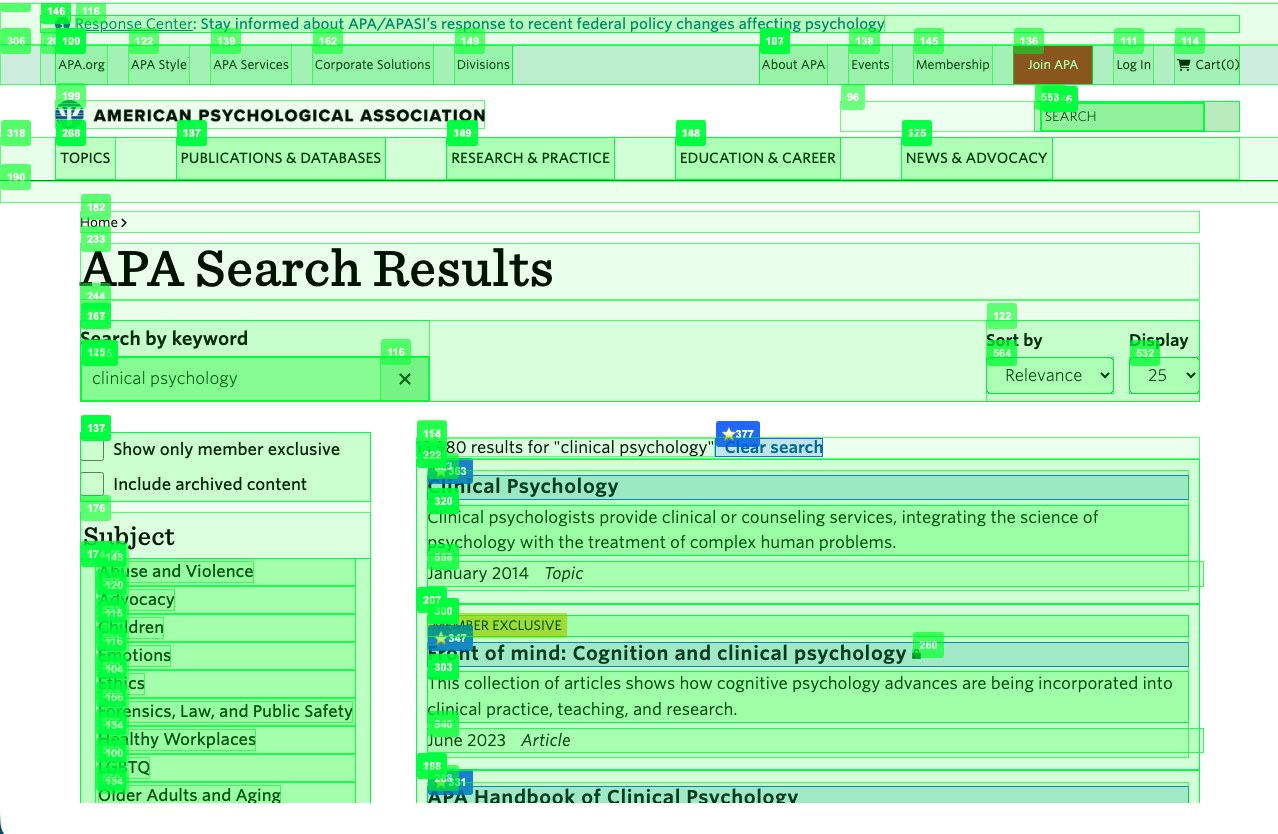
Below are the main failure classes we hit while iterating on the APA task, plus the trace signal that made each failure obvious.
1) Candidate coverage failures: the “right control” wasn’t even in view
Symptoms:
- The plan said “click search box” or “filter by year,” but the executor’s candidate list contained only nav links or result links.
- The executor either clicked the wrong thing or returned an invalid action.
Trace value:
- Candidate logs showed exactly what elements the model had access to at decision time.
- That made it clear the issue wasn’t “LLM intelligence”—it was candidate selection and snapshot coverage.
Fix pattern:
- Treat element selection as a first-class subsystem.
- Build goal-specific candidate sets:
- “focus search” candidates prioritize searchbox/textbox + search buttons
- “filter/sort” candidates prioritize buttons/checkboxes/comboboxes + year/date cues
- Increase snapshot limits when you know UI controls are commonly outside the top-ranked result region.
2) Invalid executor outputs (and why deterministic fallback is still valuable)
Symptoms:
- Executor returns an empty or unparseable action (e.g., not
CLICK(<id>)).
Trace value:
- The logs made it explicit: invalid executor output happened even when the candidate set was good.
- The trace also showed whether fallback clicks were reasonable.
Fix pattern:
- Keep a deterministic fallback (e.g., “pick the top-ranked candidate”) so the run can keep going.
- But do not confuse “run continued” with “the step was correct”—pair fallback with verification gates.
3) “Correct results state” is often easier via query augmentation than UI filters
Observation:
Manually, searching clinical psychology 2022 on APA.org surfaces 2022 results without needing a year facet.
Trace value:
- The trace made it obvious when year filtering steps were no-ops or brittle (no visible UI change, loop/no-op detection).
- We could see the URL already contained the year, making UI filtering redundant.
Fix pattern:
- Add a site-agnostic heuristic:
- if the task requires a year and the query doesn’t include it, append the year
- Add a soft “year already satisfied” guard:
- if the year is already in the URL query, don’t let “filter by year” steps derail the run
This is a good example of a “small, general heuristic” that saves you from a lot of UI-specific brittleness.
4) Loop/no-op failures that prevented extraction
Symptoms:
- Agent repeats actions that don’t change URL or page state.
- The run aborts before extraction due to loop/no-op detection.
Trace value:
- Step records include pre/post URL and snapshot digests, so it’s clear whether a step is truly no-op.
- You can distinguish “expected no-op” (redundant sort step) from “unexpected no-op” (filter click didn’t open anything).
Fix pattern:
- For READ tasks, tolerate some no-ops as “soft” when they’re plausibly optional:
- redundant year-filter when year already in URL
- sort actions that don’t visibly change anything
5) Auth/SSO drift caused by helper logic (Reveal)
Symptoms:
- During extraction warmup (“reveal results”), the agent navigated to an SSO login page.
- Extraction then read the login page and failed schema validation / returned nonsense.
Trace value:
- The trace timeline showed the exact moment the URL switched from search results to an auth/login URL.
- That pinpointed the culprit: a reveal strategy clicked a navigation link while trying to “expand/show more.”
Fix pattern:
- In generic “reveal” code, avoid clicking arbitrary anchors.
- Limit “expand” to buttons/summary elements (accordions).
- Add an auth URL guard:
- if a helper action causes navigation to a login/SSO URL, auto-undo via
go_back()and stop the helper loop.
- if a helper action causes navigation to a login/SSO URL, auto-undo via
6) Extraction correctness: titles by construction + grounding
Symptoms:
- The extractor returned metadata chips like “July 2017 Article” instead of titles.
- Evidence grounding failed because the strings weren’t actually titles.
Trace value:
- The extracted answer and evidence grounding stats were visible at the end of
read_extract. - You can separate:
- “model returned malformed JSON”
- “model returned a plausible shape but wrong content”
- “content was correct but grounding failed”
Fix pattern:
- For “first N results” tasks, force a schema that produces titles by construction:
{"type":"table","columns":["title","url"],"rows":[...]}
- Use deterministic fallbacks + preprocessing for common non-title tokens:
- drop month/year/type chips
- strip markdown formatting that doesn’t exist in DOM text
- Ground evidence deterministically from the structured answer.
7) Pagination as a second-chance fallback (only when needed)
Observation:
Many results pages only show a few items in the viewport. Pagination links are often below the fold.
Trace value:
When extraction returned “too few rows,” it was clear we needed more results visible—not more prompting.
Fix pattern:
- Do a bounded “second-chance reveal” only when
have < Nafter fallbacks:- try “Load more”
- scroll to bottom once, try again
- try guarded “Next page”
- Re-read and re-extract titles after the page changes.
A simple debugging playbook for developers
If you’re building on Sentience (or integrating via SentienceDebugger), this is a reliable order of operations:
-
Start with
result.json- Did we fail before extraction? If yes, don’t chase extractor prompt changes yet.
-
Scan the trace/log for the first “meaningful divergence”
- unexpected navigation (URL jumps to login/SSO)
- loop/no-op detection (URL and/or snapshot digest stable)
-
Check candidate sets for decision points
- If the desired control isn’t in the candidate set, the LLM can’t succeed.
- Fix coverage/ranking first.
-
Check verification gates
- If steps are marked ok without proving state changes, you’ll get “successful but wrong” runs.
- Add verification predicates where correctness depends on UI state (filters, selection, etc.).
-
Only then tune extraction
- Ensure output schema forces “titles by construction”
- Add preprocessing for common “non-title” strings
- Ground evidence deterministically
Visual trace debugging in Sentience Studio
Reading raw trace.jsonl is powerful, but it’s still a “logs-first” workflow. If you’re using Sentience Studio, the same run data becomes a visual timeline you can scrub through step-by-step.
At a high level, Studio’s Trace Debugger lets you click any step and immediately see:
- Step information: step number, success/partial/failed status, timestamp, goal, and a one-line action summary
- URLs: pre-action URL vs post-action URL (great for spotting unexpected navigation or no-op clicks)
- LLM decision: the raw model output that produced the action (e.g.,
CLICK(247)/TYPE(168, "laptop")) - Token usage: prompt/completion totals per step (helps you understand which pages are expensive and why)
- Execution details: action type, target element metadata (including element ID + bounding box), action parameters, and an outcome label (navigation/dom_updated/no_change, etc.)
For “hard” browser tasks like the APA search case study, this changes debugging from “read the logs and guess” to a repeatable workflow.
Vision vs snapshot for “hard” READ tasks (a practical view)
For a task like “search a site, constrain to a year, then extract the first 4 titles,” there are two common perception strategies:
- Vision-driven: the model looks at pixels/screenshots to decide what to click and whether the UI state “looks right.”
- Snapshot-driven: the model (or your code) consumes a structured snapshot of interactable elements and text.
In practice, these approaches are complementary.
Where vision often helps
Vision is frequently the easiest way to handle UI state-setting when the DOM structure is noisy or highly styled:
- identifying the correct search box or search icon when there are multiple similar controls
- confirming a filter is “active” via a chip, highlight, or badge
- working around pages where key controls are rendered in non-standard ways
Where snapshots often help
Once the page is in a correct results state (query applied, filters applied or encoded in the URL, enough results revealed), snapshots are usually a better substrate for:
- extracting titles and URLs in a consistent shape
- grounding/verification (“this exact title text appears in the UI”)
- controlling token usage (snapshots prune irrelevant noise)
- making failures more actionable (“the candidate set didn’t include the control”) rather than subjective (“the screenshot looked different”)
A balanced strategy that works well in practice
Many robust agents treat vision as an escape hatch and snapshots as the default:
- Use snapshots + deterministic verification whenever the page structure is sufficient.
- Use vision when snapshot structure is insufficient (e.g., canvas-heavy widgets) or when repeated no-ops suggest the agent isn’t “seeing” the right control.
Appendix: downloadable raw run log and trace (example)
These are raw files (not curated), so they’re verbose. The most useful way to read them is to search for:
- candidate sets (what the model could choose from at decision time)
- URL transitions (unexpected navigation vs expected navigation)
- reveal progress (how many results were visible before extraction)
- final extracted output (titles/URLs) and any grounding/verification metadata
Downloads:
- JSONL trace: trace.jsonl
- Run log: logs.txt
Closing: what this task teaches about “hard” READ automation
The APA task is “hard” for a reason: it’s not a single hard problem—it’s a stack of small problems where each one can fail independently:
- UI controls can be present but not in your snapshot/candidate set
- actions can be valid but no-op
- helper routines (scroll/reveal) can accidentally navigate away
- extraction can be well-formed but semantically wrong
- grounding can fail even when extraction “looks right”
The meta-lesson
Verification + traces don’t make failures disappear. They make failures observable, debuggable, and fixable with small, general heuristics instead of brittle per-site patches.
Related documentation
Trace runs, verify outcomes, and debug failures with structured evidence.
Agent tracing docs